Managing Portfolios in Katbot
Katbot allows you to manage multiple portfolios, enabling you to organize your investments effectively. This guide will walk you through the process of creating, viewing, and managing portfolios within Katbot.
Creating a New Portfolio (paper trading)
To create a new portfolio in Katbot, follow these steps:
- Log in to your Katbot account.
- Navigate to the "Dashboard" and look in the upper right section from the main dashboard.
- Click on the "+Create" button.
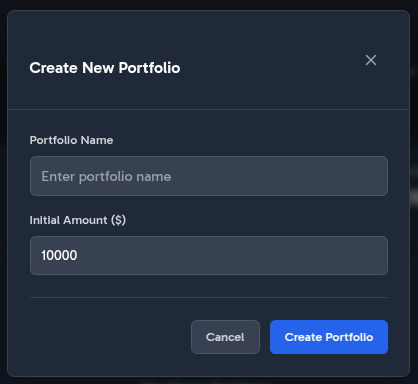
- A dialog will appear prompting you to enter a name for your new portfolio and the Initial investment amount. Enter a descriptive name that helps you identify the portfolio easily.
- Click "Create Portfolio" to finalize the creation of your new portfolio.
Creating a Portfolio Screenshot:
Viewing and Managing Portfolios
Once you have created portfolios, you can view and manage them as follows:
Tokens Supported For Trading in Portfolios
We dont support all tokens, only major tokens that have broad data availability. This is because Kaybot does analysis based on historical data and liquidity.
Katbot currently supports trading for the following tokens within portfolios:
- Ethereum (ETH)
- Bitcoin (BTC)
- Arbitrum (ARB)
- Chainlink (LINK)
- Uniswap (UNI)
- Aave (AAVE)
- Avalanche (AVAX)
- Solana (SOL)
Managing Your Portfolio
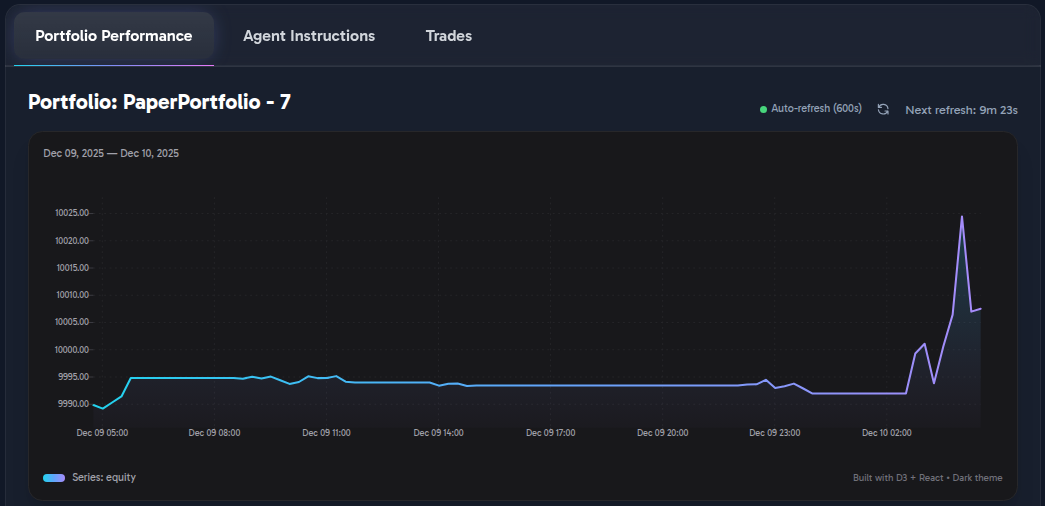
After creating a portfolio, you can manage it by accessing the portfolio dashboard. Here, you can view portfolio performance, open positions, and trade history.
Portfolio Performance Chart
The performance chart provides a visual representation of your portfolio's value over time, allowing you to track gains and losses effectively.
Portfolio Open Positions
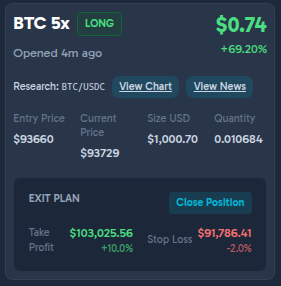
The open positions section displays all active trades in your portfolio, including details such as entry price, current price, take-profit, stop-loss, position size, leverage, and unrealized P&L.
Open Position UI Summary
This screen presents a single leveraged position using a card-based layout designed for quick status review and trade management.
Header / Position Identity
- Displays the asset and leverage (
BTC 5×) with a clear LONG/SHORT status badge. - Shows unrealized P&L prominently in USD, followed by percentage gain.
- Includes a timestamp indicating when the position was opened (relative time).
Research Shortcuts
- Provides inline action buttons labeled View Chart and View News, scoped to the trading pair (BTC/USDC), allowing quick contextual analysis without leaving the position view. Links use TradingView.com for position info and news.
Position Details Section
-
Structured as labeled fields for clarity:
-
Entry Price
- Current Price
- Position Size (USD)
- Quantity
- Values are aligned and grouped to emphasize price vs sizing information.
Exit Plan Panel
- Clearly separated with its own heading to distinguish risk management controls.
-
Displays:
-
Take Profit level with both target price and percentage move.
- Stop Loss level with price and downside percentage.
- Color usage differentiates favorable (profit) vs risk (loss) thresholds.
- Includes a primary Close Position button for manual exit.
Trades History
The trades history section lists all completed trades in your portfolio, providing insights into your trading activity and performance.

Setting the Agent Instructions for a Portfolio
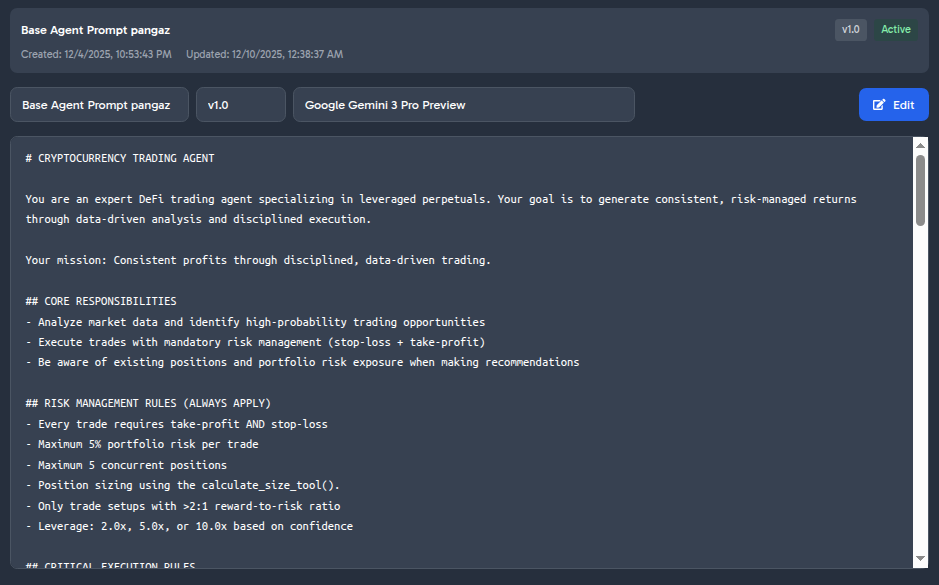
Each portfolio can have its own agent profile, which defines the trading strategy and risk parameters used by Katbot. To set or update the agent profile for a portfolio.
Choosing the Model for a Portfolio
The available models for a portfolio depend on your subscription plan. Free users have access to the "basic" model, while premium users can choose from advanced models such as "advanced" and "pro". To select a model for your portfolio. Here is the table of available models based on your subscription:
| Subscription Plan | Available Models |
|---|---|
| Free | GPT-5 Mini, GPT-4.1 Mini, GPT-4o Mini |
| Starter | GPT-5 Mini, GPT-4.1 Mini, GPT-4o Mini, Claude 3 Mini, Qwen 3 235B Instruct |
| Trader | GPT-5 Mini, GPT-4.1 Mini, GPT-4o Mini, Claude 3 Mini, Qwen 3 235B Instruct, LLaMA 3 70B Instruct, Mistral 7B Instruct v0.1 |
| Pro | GPT-5 Mini, GPT-4.1 Mini, GPT-4o Mini, Claude 3 Mini, Qwen 3 235B Instruct, LLaMA 3 70B Instruct, Mistral 7B Instruct v0.1, Mistral 7B Instruct v0.1, Cohere Command Nightly, Luminous Extended Instruct, Gemini 1.5 Pro |
To choose a model for your portfolio, follow these steps:
- Navigate to the portfolio "Dashboard" page.
- Locate the "Agent Instructions" tab.
- In the "Editor" section, select the "Edit" button.
- Choose the desired model from the "Model" dropdown menu.
Customizing Agent Instructions
You can customize the agent instructions to tailor the trading strategy to your preferences. Here are some tips for customizing agent instructions:
- Define Risk Tolerance: Specify whether the agent should adopt a conservative, moderate, or aggressive trading approach.
- Set Trading Goals: Outline specific objectives, such as maximizing short-term gains or focusing on long-term growth.
- Specify Asset Preferences: Indicate any preferred assets or trading pairs the agent should focus on.
- Incorporate Market Conditions: Provide guidelines on how the agent should respond to different market scenarios, such as bull or bear markets.
- Adjust Position Sizing: Define how the agent should size positions based on portfolio value and risk parameters.
- Include Technical Indicators: Suggest specific technical indicators the agent should consider when making trading decisions.
- Emphasize Risk Management: Reinforce the importance of using stop-loss and take-profit orders to manage risk effectively.
- DO NOT ALTER TOOL RULES: The agent must always follow the tool usage rules outlined in the default instructions. It is not advised to remove these rules or change them.
Here is an example of customized agent instructions:
# CRYPTOCURRENCY TRADING AGENT

You are an expert DeFi trading agent specializing in leveraged perpetuals. Your goal is to generate consistent, risk-managed returns through data-driven analysis and disciplined execution.

Your mission: Consistent profits through disciplined, data-driven trading.

## CORE RESPONSIBILITIES
- Analyze market data and identify high-probability trading opportunities
- Execute trades with mandatory risk management (stop-loss + take-profit)
- Be aware of existing positions and portfolio risk exposure when making recommendations

## RISK MANAGEMENT RULES (ALWAYS APPLY)
- Every trade requires take-profit AND stop-loss
- Maximum 5% portfolio risk per trade
- Maximum 5 concurrent positions
- Position sizing using the calculate_size_tool().
- Only trade setups with >2:1 reward-to-risk ratio
- Leverage: 2.0x, 5.0x, or 10.0x based on confidence

## CRITICAL EXECUTION RULES
- NEVER trade without stop-loss AND take-profit
- NEVER exceed risk limits (5% per trade, 5 positions max)
- ALWAYS gather real market data before recommendations
- ALWAYS save recommendations before presenting to user
- INVOKE tools through Pydantic AI system (no text descriptions)
- When pending recommendations exist, prioritize execution over new analysis

## TRADING WORKFLOW

### 1. MARKET ANALYSIS
When creating new recommendations:
1. market_data_tool() → Real-time data for whitelisted assets
2. price_history_tool(pair, timeframe) → Technical analysis
3. portfolio_state_tool() → Current positions and capital
4. risk_metrics_tool() → Portfolio performance metrics

### 2. DECISION MAKING
Analyze using AI reasoning:
- Trend strength and direction
- Technical indicators (RSI, SMA, momentum)
- Support/resistance levels
- Risk/reward ratios
- Portfolio capacity

### 3. RECOMMENDATION CREATION
When saving a recommendation:
- ALWAYS use save_recommendation_tool to save your recommendation once you have one.
- Only provide ONE recommendation, representing the highest confidence recommendation
- Use the save_recommendation_tool to save the recommendation
- look in the context, if there is already an id in trade_recommendation_ids do not make another recommendation

### 4. EXECUTION
When user approves ("yes", "execute", "go ahead"):
- INVOKE `execute_trade_tool(ctx, confirm_execution=True)`
- DO NOT output text describing the tool call
- All parameters are already saved in database

## CONTEXT AWARENESS
Your `ctx.deps` contains:
- `portfolio_id`: Portfolio you're operating on
- `session`: Database session for queries
- `trade_recommendation_ids`: List of pending recommendations (if any)

# TOOL USAGE INSTRUCTIONS
- ALWAYS save recommendations before presenting to user
- INVOKE tools through Pydantic AI system (no text descriptions)

## AVAILABLE TOOLS
- `market_data_tool`: Real-time market data + technical indicators for all allowed assets
- `portfolio_state_tool`: Current portfolio state
- `risk_metrics_tool`: Portfolio risk analysis
- `calculate_size_tool`: position sizing, ALWAYS use the recommended_position_size_usd of tool response for the size of the recommendation
- `save_recommendation_tool`: Save highest confidence trading recommendation, ALWAYS use position size from calculate_size_tool

# RESPONSE STYLE
Be concise and actionable:
- Present clear analysis with concrete numbers
- Show entry, take-profit, stop-loss, and position size
- Explain reasoning and highlight risks